
Adobe InDesign CC for Windows
- By Adobe
- Trial version
- 20.5
Download latest version for Windows
Editors’ Review · October 28, 2025
Seamless multi-format publishing
Adobe InDesign CC is a graphics and design tool considered the undisputed industry standard for creating professional, high-impact page layouts for both print and digital publishing. It’s the go-to software for graphic designers, prepress professionals, and marketing teams who need pixel-perfect control over typography, images, and sophisticated multi-page documents.
While there are strong competitors like Affinity Publisher and the long-time rival QuarkXPress, InDesign’s powerful feature set and tight integration within the Creative Cloud ecosystem give it a significant edge. It allows users to fluidly incorporate assets from Photoshop and Illustrator, streamlining the entire design and production workflow.
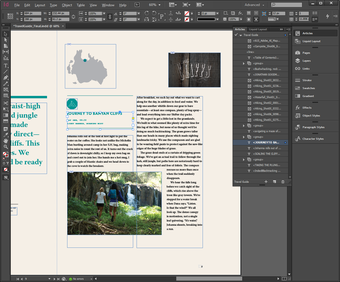
Adobe InDesign’s strength lies in its granular control over detail, particularly its advanced typography features that set the benchmark for professional typography. To ensure consistency across hundreds of pages, you can precisely adjust kerning, tracking, and leading, alongside sophisticated paragraph and character styles. The software handles master pages, automatic page numbering, and content collection/placement tools that are essential for large-scale, professional-grade document creation.
Pixel-perfect design and robust management
On the technical side, the software is built for stability when managing huge files with thousands of links and intricate cross-references. It offers robust preflight tools to check documents against print specifications before export, dramatically reducing errors in the final production. Furthermore, its Liquid Layout feature simplifies adapting designs for different screen sizes and orientations, so you can seamlessly transition from print to digital publication.
Despite its unmatched capabilities, the tool is not without its drawbacks, particularly for independent designers or small teams. The complex interface and sheer depth of features mean new users face a steep learning curve and a significant investment of time to reach proficiency. The software is also a significant resource hog, demanding considerable system memory and a powerful CPU. Slow performance is expected on older or less capable machines.
Definitive tool for professional layout
While it demands patience with its steep learning curve and a robust system, Adobe InDesign CC remains the definitive application for serious desktop publishing and design professionals. Its unparalleled feature depth, stable handling of large, complex documents, and essential connectivity to the entire Adobe suite make it indispensable for any publication pipeline, whether aiming for glossy print or engaging interactive digital media.
- Pros
- Industry-leading layout and typography control
- Seamless integration with Adobe Creative Cloud
- Robust tools for large, multi-page documents
- Excellent preflight and digital publication features
- Cons
- Steep learning curve for new users
- Can be resource-intensive during heavy usage

Technical
TitleAdobe InDesign CC 20.5 for WindowsRequirementsWindows 10LanguageEnglishAvailable languages
- German
- English
- Spanish
- French
- Italian
- Dutch
- Polish
- Portuguese
LicenseTrial versionLatest updateOctober 28, 2025AuthorAdobe
Program available in other languages
- Adobe InDesign CC herunterladen
- 下载 Adobe InDesign CC
- Télécharger Adobe InDesign CC
- Descargar Adobe InDesign CC
- Scaricare Adobe InDesign CC
- Pobierz Adobe InDesign CC
- Adobe InDesign CC をダウンロードする
Adobe InDesign CC for Windows
- By Adobe
- Trial version
- 20.5
Download latest version for Windows
Changelog
We don’t have any change log information yet for version 20.5 of Adobe InDesign CC. Sometimes publishers take a little while to make this information available, so please check back in a few days to see if it has been updated.
Can you help?
If you have any changelog info you can share with us, we’d love to hear from you! Head over to our Contact page and let us know.
Explore apps
- The GIMP 32-bit
- Paint.NET
- Macromedia Flash 8
- Adobe Camera Raw
- PSD Codec
- Trapcode Particular
- 3D Architect Home Designer Pro
- PDF Reader for Windows 8
- BeautyCam
- Poster Font Light
- Free PDF to Word Converter
- Insight 3D
Related software
- Adobe ReaderA practical PDF solution for viewing and annotating
- Adobe Photoshop 7.0.1 UpdateA stability update for creative professionals
- Adobe Illustrator CCSolid choice for Creative Cloud vector design
- Adobe Photoshop CS4 updateHow Does the Adobe Photoshop CS4 Patch Work?
- Anastasiy’s Extension ManagerAnastasiy’s Extension Manager is a very useful app that makes installation of extensions, plug-ins, and panels into Adobe Creative Suite and Creative Cloud an easy affair. The app supports all 3rd-party extensions, including MagicPicker color wheel, MixColors color mixer, and DiskFonts font manager. Adobe software supported includes: Photoshop. Illustrator. InDesign. Premiere Pro. Flash Pro. AfterEffects. Dreamweaver. Fireworks. Overall, Anastasiy’s Extension Manager has a simple, uncluttered, straightforward interface and advanced extension management tools that makes it easy to add new extensions into Adobe’s Creative Suite and Cloud. Looking for the Mac version of Anastasiy’s Extension Manager? Download Here
- CASE StudioFeatures Of Case Studio
- FastStone Photo ResizerA FastStone Photo Resizer To Get Routine Picture Retouching
- Adobe Content ViewerComprehensive Review of Adobe Content Viewer
- Autodesk 123DAutodesk 123D Digital Modeling Software
- Game EditorGame Editor – Game Development Software
- SmartVizor Variable Barcode Label Printing SoftwareSmartVizor Publishing Software is a powerful, stand alone, and extremely easy to use printing application. The SmartVizor Suite of tools, is a truly viable software solution designed for creating personalized communications and professional one to one documents to help your business stand out from the crowd and impress your customers. The key to SmartVizor’s innate intuitiveness lies with its rather excellent graphical user interface. (GUI) It functions as an easy-to-use design tool that will have you designing beautiful looking boilerplate for your documents quickly and easily. Crucially, you can also use any application to create your boilerplate documents. This can be a real time-saver if you receive boilerplate documents from sources outside your company (such as from customers) because you don’t have to painstakingly re-create the documents in-house. (Or employ unreliable freelancers to do it.) SmartVizor can be used to create new designs from scratch and can merge any design with any database and can print on any printer. That’s a key point that separates SmartVizor from the rest of the crowd. SmartVisor supports any printer in the Windows operating system. SmartVizor has also been designed so that you can use a OLE Object file as your boilerplate document. This means you can use Adobe InDesign or Adobe PageMaker,Adobe Illustrator, Microsoft Word or virtually any application to create your boilerplate-documents. When you use SmartVizor for your variable-data-printing projects, virtually any word-processing application or page-layout application can be used to create your boilerplate documents (master documents). SmartVizor can also extract data from most database formats including all the usual suspects such as Microsoft Excel, Microsoft Access, Microsoft FoxPro, delimited ASCII (.csv, .txt), MySQL, Oracle, SQL Server, and IBM DB2. (We’d never heard of IBM DB2, but have been assured that it is a real thing. Go figure.) SmartVizor also provides ODBC support, so you can connect directly to your database and use SQL statements if you want to. SmartVizor excels when it comes barcodes and barcode printing, supporting over 50 symbologies including Code 128, Data Matrix, USPS OneCode, EAN-128, UPC/EAN, ITF, QR Code, Code 16k, PDF417, MicroPDF417, LOGMARS, Maxicode, GS1 DataBar, Aztec, Composite Symbols and more.
- Adobe Acrobat Reader DCReliable PDF viewing and annotation for all users
Last updated
- Autodesk 3DS MaxPrecision in 3D Creation
- SketchUp MakeIntuitive platform for professional 3D design
- Autodesk DWG TrueviewA reliable DWG viewing solution
- ArcSoft PhotoImpressionHow Can ArcSoft Photo Impression Improve Your Digital Photography Skills?
- CCleaner FreeCleaning and optimization made simple
- Adobe StockThe ultimate stock library for creative professionals
- Banner Designer ProBanner Designer Pro Windows Software
- FlipViewerFree Design & Photography Program for Windows: FlipViewer
- Realtek HD Audio Drivers x64The essential backbone of Windows sound
- EA SPORTS CricketEA SPORTS Cricket 2007: A fast-paced sports game
- IBM SPSS StatisticsPowerful statistical analysis for non-coders
- Adobe PDF ConverterAdobe PDF Converter – Free File Converter to PD