

Microsoft 365 for Web Apps
- By Microsoft Corporation
- Free
- 0
Microsoft 365 is Microsoft’s cloud collaboration suite (formerly known as Office 365), which provides a secure space to store, edit and share files and documents. It has a vast array of tools that can help to connect dispersed teams using shared calendars, messaging and conferencing tools.
Advertisement

The business class email provides 50 GB of storage per user, and is able to send messages up to 25 MB in size. This is great for sending images and applying custom formatting. With Microsoft 365 you can customize inbox rules and notifications, and update your calendar and to-do list, in order to help you prioritize your tasks. The online chat and instant messaging tools let you communicate with colleagues more effectively along with one-to-one, or one-to-many voice and video calling.
Some great features of Microsoft 365 are the collaboration and knowledge sharing tools for both internal and external purposes. Documents can be accessed and viewed by clients, and you can also create project-specific mailboxes and websites that can be tailored for specific teams, complete with automatic policies.
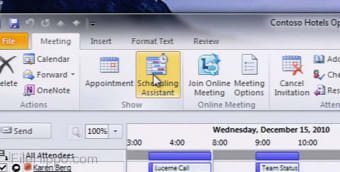
Instant MessagingWith Microsoft 365 you can use your computer for video calls and are able to conduct online meetings or connect with your co-workers via instant messaging.
File SharingThe ability to share your work with others, and be able to collaborate together, is a must-have feature of today’s modern office. Microsoft 365 lets you store and organize your most important documents easily, with 10GB of overall storage to work with, you’ll never run out of space to store what you need.
Calendars and EmailYou no longer have to be tied to your desktop in order to view emails and organise your calendar. With Microsoft 365 and a smart device, you carry your email and calendar with you, wherever you go. Calendars and Email can be accessed from any supported computer or smart device that has an Internet connection.
Multi LanguageMicrosoft 365 supports the following languages: Arabic, Chinese (Simplified), Czech, Danish, Dutch, English, Finnish, French, German, Hungarian, Indonesian, Irish, Italian, Japanese, Norwegian, Polish, Portuguese, Russian, Spanish, Swedish, Turkish, and Ukrainian.
Supported countries include Australia, Canada, Europe, India, Latin America, Middle-East and Africa, United Kingdom, United States.
PricingMicrosoft 365 uses a subscription pricing model, with plans starting from $4.00 per month. Microsoft also provides a free trial to test out the software (no credit card required).
Bottom LineMicrosoft 365 is a secure way to create, store and edit your documents online. Using Microsoft 365 you can run your business with powerful cloud services that don´t require any in-depth IT expertise. You can access your emails, and attend meetings virtually, along with sharing files or creating a professional website. No matter what it is you need, Microsoft 365 helps you be productive on the go. It works with mobile devices such as Windows Phone, iPhone, iPad, Android, Symbian and Blackberry, and can be accessed via Mac OS or Windows OS.

Advertisement
Technical
TitleMicrosoft 365 0 for Web AppsRequirements
- Firefox
- Chrome
- Internet Explorer
- Opera
LanguageEnglishAvailable languages
- German
- English
- Spanish
- French
- Italian
- Japanese
- Polish
- Chinese
LicenseFreeLatest updateSeptember 1, 2020AuthorMicrosoft Corporation
Also available in other platforms
Program available in other languages
- Télécharger Microsoft 365
- Microsoft 365 をダウンロードする
- 下载 Microsoft 365
- Scaricare Microsoft 365
- Pobierz Microsoft 365
- Descargar Microsoft 365
- Microsoft 365 herunterladen
Microsoft 365 for Web Apps
- By Microsoft Corporation
- Free
- 0
Changelog
We don’t have any change log information yet for version 0 of Microsoft 365. Sometimes publishers take a little while to make this information available, so please check back in a few days to see if it has been updated.
Can you help?
If you have any changelog info you can share with us, we’d love to hear from you! Head over to our Contact page and let us know.
Explore apps
- Google Docs
- PowerApps
- SlideRocket
- Workable
- Mint
- TalentLMS
- iCIMS Applicant Tracking System
- Scriblink
- MindMeister
- Expensify
- Smartsheet
Related software
- Microsoft ProjectMicrosoft Project is a flexible tool for project management, which is delivered through Microsoft Office 365. It is a comprehensive project management solution that has been designed for businesses of all sizes, from SMB to large corporations. Microsoft Project enables businesses to get started, manage project portfolio investments, and then successfully deliver projects, on time, with value. Microsoft Project provides your business with a powerful, visually enhanced way to efficiently manage a wide range of projects and programs. From meeting important deadlines, to choosing the correct resources, Microsoft Project provides new and intuitive ways to plan, collaborate with various individuals and teams, and manage projects successfully. For instance, a noteworthy feature of Microsoft Project is the ability to easily copy project information to Office apps such as PowerPoint and save important data to Office 365 or SharePoint. A key feature of Microsoft Project is the ability to add new tasks or revise the organization of a project, midway through it. Because, as you well know, the goal posts can (and often do) change during a project. Microsoft Project lets you work efficiently and effectively, as you are able to prioritize tasks and can manage your projects effectively from anywhere. Microsoft Project also comes with project budgeting tools that can help you estimate the costs for the entire span of a project. With tools for project scheduling that allow you to define tasks, and assign them to various teams, along with having the ability to track assignments, you will always have a clear vantage point, to oversee projects from. Reporting With Microsoft Project you can create extensive reports and analyses directly from the platform. The functions are very similar to those of Microsoft Excel and Microsoft Word, so will be familiar to many users. Multi Language Microsoft Project supports the following languages: Arabic, Chinese (Simplified), Chinese (Traditional), Danish, Dutch, English, French, German, Hebrew, Italian, Japanese, Korean, Portuguese, Russian, and Spanish Pricing Microsoft Project uses a subscription pricing model with plans and pricing available on request from Microsoft. There is also a free trial available (no credit card required). Bottom Line Microsoft Project offers flexibility and choice by providing tailored work management solutions for individuals, teams, and enterprises. With interactive dashboards and reporting functionalities, project managers can prepare insightful reports and make executive decisions regarding key issues, such as time scales and staffing levels. Microsoft Project can be deployed both on-premise and in the cloud. The advantage of the web-based version is that it allows project managers to collaborate with their team remotely using smartphones and mobile devices. Overall, Microsoft Project is exceptionally intuitive and provides a great balance of complexity and usability. It is used in various industries, including government, manufacturing, construction, pharmaceuticals, retail, financial, and health care services.
- YammerYammer is an enterprise social network with a wide range of features that have been designed to improve communications across your entire organization. With Yammer you can create groups, and provide a collaborative workspace for teams to share files, organize project deadlines, and gather feedback. Yammer can also be used as an instant messaging service, with a place to conduct private conversations with two or more people. With Yammer, you can see who is online at any time and use the @mention function to tie in more people to the conversation. All communications are stored and organized in the Yammer inbox. With Yammer you can follow all your @mentions, conversations, group announcements and private messages. There is also a Priority Messages tool, which allows you to focus on the most important communications before turning your attention to anything else. Yammer is a great tool to identify experts within the company and locate relevant people within the Member Directory. Users can create a company profile with some basic info, a photo, and information on the various skill set they have. Integrations Yammer integrates with the following apps and services: Microsoft Dynamics CRM, Microsoft Dynamics AX, SharePoint, Badgeville, Scoop.it, Gooddata, Twitter, Zendesk, Hootsuite, Mindflash, and GitHub. Yammer also has an API available as well, and it comes with English and Spanish language support. Yammer supports Windows Phone, and Android, and iOS devices. Pricing Yammer uses a freemium subscription pricing model with plans starting from $3.00 per month for the Yammer Enterprise Standalone plan. Next up is the Office 365 For Business plan, which starts at $5 per user per month. There is also an Office 365 For Education plan available as well. Yammer offers a free trial available (no credit card required). Bottom Line Yammer can be used by businesses of all sizes, from large enterprises through to small firms, and everything in-between. With stand out features such as mobile compatibility, integration with a wide variety of apps and services including Office 365, and the ability to share files, links, and images across private conversations and public groups, you can see why businesses from all sectors are using Yammer.
- RingCentralRingCentral is a cloud phone system that can securely deliver high quality voice, fax, text and conferencing for your business; no matter what the company’s size, budget, location or devices used by your employees. With RingCentral you connect IP desk phones and PCs to your Internet connection and then install the RingCentral Mobile App on your employees’ smartphones. It is these endpoints which communicate with the RingCentral cloud platform to enable a seamless communications system across all your office locations. RingCentral’s cloud communications solution is so much easier to manage, not to mention far more flexible than standard legacy, on-premise PBX phone systems. No matter what the nature of your business, RingCentral can help you stay connected across multiple locations, with desk phones, smartphones/tablets, and soft phones. Moving to RingCentral’s cloud phone system from your current system is a fast and straightforward procedure; a RingCentral implementation specialist will manage the transition for you, so all your office locations and remote working employees will be taken care of. The logistics of transferring your existing phone numbers, ordering new lines, or choosing from local, toll-free, and vanity numbers can be undertaken by your account representative, thereby leaving you to get on with the most important thing; your business. Flexibility RingCentral provides you with a flexible communications platform, which can adapt to the needs of your business. RingCentral’s systems are a robust solution that can easily be scaled as your business grows and expands. You can set up, manage and access your communications from anywhere you choose by using any smart device or via the web. RingCentral utilises a unique click/tap interface that is easy to operate and thereby will reduce IT workloads, and increase your productivity levels. RingCentral’s Intelligent collaboration will give your employees the power to share files, manage projects, and collaborate across your business more productively than ever before. Call Management RingCentral’s business phone system is fully customizable to suit your needs. When customers contact your business, you want them to experience a professional and personalised service. The advanced call management features of RingCentral’s cloud phone system means that your team will provide a clear and consistent service across the board. When you first log in, an online wizard walks you through the setup of your users and basic phone system settings. You can then move on to set up services such as Call answering rules, Call forwarding, Call logs, and Message alerts. There are also really useful features such as Missed-call notifications and Automatic call recording. Integrations and Mobility RingCentral provides you with an integrated voice, fax and text service. The cloud-based office phone system lets you work when you need to. Because nearly all management features are available on RingCentral Mobile Apps for iOS® and Android™ you are never tied down. RingCentral allows for seamless integration with other cloud business apps you rely on day to day, including Microsoft Outlook®, Box, Dropbox and Google Drive. It also integrates really well with services from Oracle® Sales Cloud, Salesforce®, Zendesk® and Office 365™. These integrations and supported services means you will stay connected and remain productive. Pricing RingCentral operates a subscription pricing model and services start from $19.99/month, with a Free Trial (No Credit Card required) to let you feel comfortable trying out their services. RingCentral Office™ services start from $19.99 per user and RingCentral Professional™ is charged from $9.99 per user. Bottom Line RingCentral is a key solution for Freelancers, Large Enterprises, Non Profits, Public Administrations, and Small Businesses alike. The communication services are provided at a fraction of the cost of outdated PBX hardware, and because it supports devices from across all major platforms including iOS®, Android™ Windows Phone, and Mac OS/WindowsOS, combined with a seamless integration with other cloud business apps, RingCentral is a complete cloud phone solution that covers all the bases.
- BoxBox is a simple, scalable and affordable solution to manage your documents and media online. With Box you can share files as a link, or sync files on your desktop. Whatever you need, from whatever device you use. With Box, you are covered. Box lets you access, share and collaborate on files anywhere, and from any device; via the desktop or secure mobile apps. It allows you to share folders, exchange feedback or save files for offline access. Box works in any browser and allows you to store and manage all your content from the cloud. Box also lets you share files instantly and access documents from anywhere, so no matter what device you choose, you can get fast, easy access to your documents, project plans, presentations and videos. With Box, you will always have the latest data for your customers, whether that be on or offline. Online Workspaces You can turn any folder you have into a workspace, which you can share with colleagues or even with outside clients. With Box you can exchange documents online, track changes with version history, and assign basic tasks. Box makes collaboration easy. Administration Box makes it simple for you to maintain a central view of all content and users in your account, via the powerful admin console. From the console you can set access permissions and passwords, and use SSL file encryption tools, etc. It is easy to setup, manage and use. Integrations Box integrates with the following apps and services: Cisco WebEx, DocuSign, Microsoft Office 365, NetSuite, Okta Identity Management, and Salesforce Sales Cloud. Box also has an API available as well, and is compatible with Android, and iOS devices. Pricing Box uses a Freemium subscription pricing model, with plans starting from $0.00 for Box Personal (for one user) and $5.00 per user, per month, for Box Business. There is also a free trial available (no credit card required). Bottom Line Overall, Box is suitable for all kinds of users, from various kinds of backgrounds and industries, including freelancers, large enterprises, SMB’s, and non-profits. With Box you get seamless integrations and can access content with a range of other leading business apps and services. Box supports English, French, German, Italian, and Spanish languages.
- ClioClio is a law practice management system, which is designed for the legal industry, specifically solo practitioners and small law firms. Clio is based in the Cloud, therefore all of you important client data is securely accessible from anywhere that has an Internet connection. Whether that be from your PC, your Mac, or your mobile device. Clio provides a comprehensive solution for running a law practice. From intake to invoice, with powerful features to manage cases, clients, documents, bills, appointments, time-tracking, reporting, and accounting. Task Scheduling Clio has rich calendaring and task management capabilities that help to facilitate collaborative, accurate deadline management. Time Tracking/Billing A great feature of Clio is the simple time tracking tools that ensure accurate billing and recovery. With the ability to start and stop multiple timers for full time tracking, you will always be on top of your time management. Clio’s intuitive billing system streamlines the process of generating flexible, professional-looking invoices. Document Management As Clio utilizes the power of the cloud, you are able to quickly and securely store and access electronic copies of relevant file correspondence. Bank Grade Security Sensitive client data is protected with 256-bit SSL encryption combined with enterprise-class data security and redundancy. Integrations Clio seamlessly integrates with the following apps and services: Box, Chrometa, Dropbox, Fundbox, InvoiceSherpa, Microsoft Office 365, NetDocuments, QuickBooks Online, RightSignature, Xero, and Zapier. Clio supports the following devices: Mac, Windows, Web-based. It also has an API available for use. Pricing Clio uses a subscription pricing model with plans starting from $39.00 per month. It also has a free trial available, with no credit card required. Bottom Line Overall, Clio is a solid, comprehensive cloud-based practice management platform for the legal industry. By utilizing the cloud, Clio helps manage client relationships and document management. It also streamlines administration tasks and collaboration, and optimizes marketing initiatives.
- GmailGmail is the free webmail, POP3, and IMAP email service provided by Google, which is integrated into its suite of web apps. Gmail is available to anyone who signs up for a Google account. Gmail is highly considered to be one of the best Web-based email accounts to have. Unlike its competitors, Gmail has a minimalistic, ad free homepage that is great to look at. As soon as you sign in, you can immediately see your inbox, the left bar shows your email folders and contacts. The service can also be linked to Google Chat. If you are signed in, your online contacts will also appear here, and you can chat to them without leaving the confines of Gmail. Key features include: Mass storage: 7 GB of free storage space available. Less spam: Gmail blocks spam before it gets to your inbox. Built-in chat: supported chat directly in Gmail or talk face to face with voice and video chat. Mobile access: Gmail mobile is available across many platforms. Gmail is fast and reliable and uses excellent spam filters to keep your inbox clean. The settings are easy to use and are highly customizable. You can adjust keyboard shortcuts, allow/ deny automatic images, set signatures and out-of-office auto reply. If you don’t like the original flavor, you can also customize a theme that suits you better too. Overall, Gmail provides a great webmail service. It has support across the board for Google’s apps and services and has a clean and fresh interface that is distraction free and easy to use. It supports offline access and Yahoo!, Hotmail and other mail services can be imported and integrated into your Gmail inbox to give you a well supported service.
- Google DocsCreate basic documents from scratch or start from a template. You can easily do all the basics, including making bulleted lists, sorting by columns, adding tables, images, comments, formulas, changing fonts and more. And it’s free. Upload your existing files. Familiar desktop feel makes editing a breeze. Edit and present with others in real time. Edit and access from anywhere. Publish your work as a web page. Choose who can access your documents. Share instantly.
- Pixlr Image and Photo EditorPixlr is a free online photo editing suite that is split into three different apps that have been built from the same engine. Simply pick the one best suited for what you need and away you go. As Pixlr is a web service it provides a solid platform to work from. You can combine image design and paint tools with photo editing. The interface is intuitive with a gentle learning curve, so users of all levels of expertise will be able to navigate it with few issues. If you want to create an image, layer one image over another or use a variety of effects, filters and level adjustments to transform photographs, Pixlr can do it all. Key Features include: Variety of filters and effects. Custom Brushes. Customizable user-friendly interface with movable and scalable windows. History window for quick undo/redo. Fee-hand crop, move, super-impose and interpolate images and rotate and remove entire canvases. Pixlr Editor mimics native photo editing apps such as Photoshop. The structure and design of this technical editor allows you to seriously edit images. The interface looks familiar with toolbars along the left hand side and top. Along the right hand side you have a Navigator, Layer Controller, and History. The top bar is equipped with layers, adjustments and a stack of filter options. Pixlr Express gives you an simple service with some neat features. You can start from four points; Browse, Open URL, Webcam, or Collage. The interface is simpler than the Pixlr Editor. You have six different editing tools to choose from: Adjustment, Effect, Overlay, Border, Sticker and Text. Next up is Pixlr-O-Matic. This is the simplest version of the app. It has the least amount of features, but, is arguably the most fun to use. You start by selecting your image, then you change the effect/distortion of the picture by choosing from a massive range of effects. Then you can change the border to finish. All three parts of these apps are well developed and have been designed with a specific purpose. If you need to edit your next masterpiece or even make a great cover photo, Pixlr is a great choice because no matter what platform you access the web app from, you still get the same standard, uniformed Pixlr experience. Overall, Pixlr is a very functional photo editing suite, with everything you could possibly need. The interface is easy to use and the tools are are varied as your imagination. Pixlr really is a perfect example of an app which hits all the right notes and provides a great, free service.
- PhotoFuniaPhotoFunia is a photo editing web app* that lets you upload your images into different scenes. You can upload any photo you like to place yourself in situations that would never happen in real life, such as your head in a lions mouth, or your dad’s photo inside a NASA spacesuit. With PhotoFunia it’seasy to add fun to your photos. The web app has stacks of preset images to insert your photos into. The interface is straightforward with a photo uploader and text fields to populate with your text. You can even change things like font and background, depending on the scene. Once you have found the perfect scene and thought of a witty comment, now you’re ready to share your creation with your friends. There are social network buttons integrated to the web app, so you don’t even have to save your creations and upload them separately. Overall, PhotoFunia is free and very easy to use. Just select an effect you like, upload your photo and share! *PhotoFunia is also available on Android, iOS, Windows Phone, BlackBerry, and even Symbian.
- ChatGPTFree conversational AI
- Project xCloudFree Xbox cloud gaming app
- GoDaddyGoDaddy is the largest domain name registrar on the planet, and has one of the most comprehensive
You’re so awesome! I don’t believe I have read a single thing like that before. So great to find someone with some original thoughts on this topic. Really.. thank you for starting this up. This website is something that is needed on the internet, someone with a little originality!