- By Mozilla Organization
- Free
- 87.0
Download latest version for Windows
Installed through our safe & fast downloader (more info)
Browse the Web on Mozilla Firefox
Mozilla Firefox is an open-source browser, which launched in 2004. Its simple and easy to use, with an excellent UI and in-built features. It is a popular browser with developers and has an active community of users. Firefox is available to download on a number of devices, including desktop, mobile, tablets, even the Amazon Firestick TV.
Some features include tabbed browsing, spell checking tool, incremental search, live bookmarking, download manager, private browsing, and geolocation. Tabbed browsing makes it easy and quick to work on multiple windows at the same time. The in-built spell check tool is great for writing and content editing. Incremental search gives suggestions and gives back queries that are related to our search.
What are the main features of Mozilla Firefox?
Bookmarking helps us organise the preferred websites more, and Firefox does it efficiently. Firefox offers the feature of Smart Bookmarks, which allows users to visit their most frequently used websites on the toolbar. Geolocation allows the search to show results based on your geographical location, which helps throw up more relevant searches. The download manager organises and shows downloads you make through the browser. Apart from the in-built add-ons, add-ons created by 3rd party developers can also be added to Firefox.
Firefox has a Smart Location bar, which not only searches the location of a website through the URL but also searches bookmarks for the page. It tracks the relevant keyword not online the URL.
Is Mozilla Firefox free to use?
Yes, Mozilla Firefox is entirely free to download and use. There are no paid versions or subscriptions required.
Is Mozilla Firefox safe to use?
Mozilla Firefox is considered a very safe web browser. It uses a variety of security features to protect users from online threats, including phishing attacks, malware, and tracking cookies.
How can I customize Mozilla Firefox to my liking?
Mozilla Firefox offers a wide range of customization options to personalize your browsing experience. Here are some examples:
- Themes: Change the look and feel of your browser with different themes.
- Add-ons and extensions: Add new features and functionality to your browser with thousands of available add-ons and extensions.
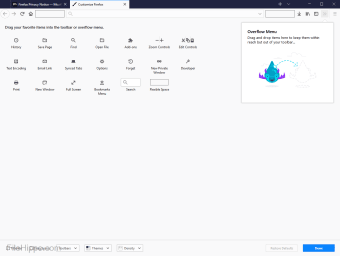
- Toolbars: Customize the toolbar to include your favorite tools and features.
- Homepage: Set your preferred website as your homepage.
- Search engine: Choose your preferred search engine.
Further customization options include:
- Profiles: Create multiple profiles for different users.
- Bookmarks: Organize your favorite websites for easy access.
What is Mozilla Firefox compatible with?
While it started from Windows, Firefox is now compatible with almost any device and operating system. Available across Windows, iOS and Linus, to be played on desktops, laptops, mobile phones, tablets, and now even on Amazon Firestick, and other smart TVs. Firefox add-ons using an HTML or JavaScript API can be installed into the browser. Firefox supports all the major web standards, HTML, XML, XHTML, CSS, JavaScript, DOM, MathML, SVG, XSLT and XPath. However, Firefox does not support ActiveX, due to security vulnerabilities. It can still be used using third-party add-ons, but they do not work for all versions of Firefox.
What are the pros of Mozilla Firefox?
Firefox offers high-speed access to the internet, with an efficient interface and customisable settings. Back in 2004, when Firefox was introduced to the world, most windows users were only exposed to Explorer, which was slow and heavy to use. Firefox changed the way we browsed the internet and it remains one of the most popular browsers for Windows users. Also, Firefox has security features in-built and pre-installed, protecting users from security breaches. Spyware and pop-ups are blocked, and there is protection against malware and viruses. Firefox uses “Safe Browsing” as a security protocol, which is developed by Google. Firefox is serious on privacy protection and its safety protocols and add-ons offer optimum protection from privacy breaches.
A simple interface, which is not heavily complicated, allows for easy navigation. The choice of add-ons and extensions make for an interesting browsing experience. Add-ons that sync passwords and browser history ensure seamless browsing. A minimalistic interface ensures that it is fast and easy to load the browser which makes starting up the browser rapid.
What are the cons of Modzilla Firefox?
While Firefox works excellently on a Windows PC, there are several compatibility issues with other operating systems and devices. Not all websites are compatibles with Firefox, and there are some writing tools and CMS for websites that face compatibility issues as well. On mobile too, Firefox is not the first choice for users, as it is not pre-loaded or default on most smartphones.
Firefox users also face issues while performing multiple functions. For instance, downloading and browning on different tabs sometimes results in the browser being hung. The download also doesn’t resume automatically and needs to be manually restarted. Also, the Firefox program consumes a lot of space and memory, making the overall performance of the operating system slower at times.
What are the alternatives to Mozilla Firefox?
Some of the main alternatives to Firefox are Google Chrome, Safari, Microsoft Edge, Thunderbird, or the good old Internet Explorer. Google Chrome is a preferred browser over Firefox since most consumption of content has moved from desktop to mobile, and in Android mobiles, the Google Chrome browser is pre-installed. Also, Chrome allows for syncing across devices and accounts and is extremely well integrated with Google apps. Firefox falters here because mobile users prefer to use a pre-set Chrome or Safari.
Unlike Google Chrome, which is fully integrated with the Google Search engine, Firefox is not a search engine but simply a browser, and Google is the default browser. Earlier, the default engine was Yahoo, but it has now switched to Google.
The popularity of Google Chrome ensures that most websites are made to accommodate the browser and are designed to work optimally on Chrome, and some websites are not compatible with Firefox. Even though Firefox has a better UI than Safari, the default settings of a Safari browser on mobile phones ensure that it is used more frequently than Firefox.
There is also Internet Explorer, which is pre-installed in Windows as the default browser, but it is common knowledge of how slow and heavy the browser is to use. The Bing search engine doesn’t help either. Firefox took over the browser market from Internet Explorer way back in the early 2000s, so it is safe to say that Firefox is any day preferred over Internet Explorer.
Is Mozilla Firefox discontinued?
Mozilla continues to actively develop Firefox, with ongoing support for desktop versions on Windows, macOS, and Linux, as well as mobile versions for iOS and Android. Firefox remains Mozilla’s flagship product.
Can I go back to an older version of Firefox?
You have the option to revert to an earlier version of Firefox by visiting Mozilla’s archive of past Firefox releases through the provided links. It’s important to be aware, though, that older versions may pose security risks, increasing susceptibility to attacks and scams. For optimal security, it’s advised to stay updated with the latest version of Firefox.
Final thoughts on Firefox
Firefox is an easy to use web browser, with a good UI and add-ons that enhance the experience of browsing. It’s minimalistic interface ensure that the browser is light, and has a fast star-up time. However, Firefox is not a prefered browser for mobiles, and with an exceedingly mobile centric approach to developing content and websites, it has fallen behind Google Chrome, which has taken the larger market share. With integration and compatibility issues, Firefox is soon becoming the less preferred option for users. It’s not Internet Explorer but then it’s also not Google Chrome.
Advertisement
Technical
TitleMozilla Firefox 64-bit for PC Windows 87.0 for WindowsRequirements
- Windows Vista
- Windows 2000
- Windows 98
- Windows 10
- Windows 7
- Windows 8
- Windows 2003
- Windows XP
LanguageEnglishAvailable languages
- German
- English
- Spanish
- French
- Italian
- Japanese
- Polish
- Chinese
LicenseFreeLatest updateDecember 8, 2023AuthorMozilla OrganizationSHA-1
544d184c21a5fa03ed5d5bfecb6d9ede79617728
FilenameFirefox_Installer.exe
Program available in other languages
- Télécharger Mozilla Firefox 64-bit for PC Windows
- Mozilla Firefox 64-bit for PC Windows をダウンロードする
- 下载 Mozilla Firefox 64-bit for PC Windows
- Scaricare Mozilla Firefox 64-bit for PC Windows
- Pobierz Mozilla Firefox 64-bit for PC Windows
- Descargar Mozilla Firefox 64-bit for PC Windows
- Mozilla Firefox 64-bit for PC Windows herunterladen

Mozilla Firefox 64-bit for PC Windows
- By Mozilla Organization
- Free
- 87.0
Download latest version for Windows
Changelog
We don’t have any change log information yet for version 87.0 of Mozilla Firefox 64-bit for PC Windows. Sometimes publishers take a little while to make this information available, so please check back in a few days to see if it has been updated.
Can you help?
If you have any changelog info you can share with us, we’d love to hear from you! Head over to our Contact page and let us know.
Explore apps
- Google Chrome (64-bit)
- Mozilla Firefox
- Opera Browser
- Brave
- Google Chrome for Work 32-bit
- UC Browser
- Ghost Browser
- SlimBrowser Portable
- AOL Desktop Gold
- Sidekick
- Utilu Internet Explorer Collection
- LocalDeli
Related software
- Mozilla Firefox BetaFaster and secure browsing!
- Mozilla FirefoxMozilla Firefox: A Free Open-Source Browser
- Free Download Manager 64-bitFree download management software
- BraveA good way to surf the internet safely
- FireminMozilla Firefox is a great web browser, however it does have drawbacks, namely it is loves to eat up memory. Firefox has always been affected by this issue and memory leaks are one of the issues that needs to be resolved in order to attract more users. Firemin is a small app that runs from the system tray and tries to address the problems associated with Firefox’s memory hogging ways. It works with XP, Vista, Windows 7, and Windows 8, and runs on both 32 and 64-bit versions. Due to Firefox’s memory leakage, Firemin runs the clean memory API call a few times per second, rather than Windows Memory Management which performs similar operations less frequently. Many would argue that Firemin is not a proven app and the benefits of using it cannot be quantified. That being said, the app is Open Source and free to use, so if it works for you then great! If you would rather rely on Windows Memory Management to periodically scan running processes and request them to release unused memory, then simply choose Windows to manage it.
- Opera BrowserA fast, secure, and feature-packed free browser
- Mozilla ThunderbirdMozilla Thunderbird makes e-mailing safer, faster, and easier with features such as intelligent spam filters, a built-in RSS reader, and quick search. Thunderbird was designed to prevent viruses and to stop junk mail. Thunderbird includes tabbed e-mail, new search tools and indexing, smart folders, support for Firefox, a simplified setup wizard and robust junk protections that include phishing and spam filters. Key Features Include: Tabbed email. An Archive feature similar to the one found in GMail. Lightning fast search. Smart folders. Thunderbird has junk mail tools that have been updated to stay ahead of spam and features anti-phishing protection. Looking for the Mac version of Thunderbird? Download Here
- Internet BrowserInternet Browser by Mako Apps: A reliable choice in the sea of browsers
- Opera GXA free web browser for gamers
- WinRAR 64-bitArchiving made easy with Winrar
- MaxthonMaxthon: A strong alternative web browser
- Firefox ESRIs It a Good Thing That Microsoft Is Getting rid of the Firefox Web Browser Engine?
Advertisement
Older versions
- Mozilla Firefox 64-bit for PC Windows 68.0-beta-14
- Mozilla Firefox 64-bit for PC Windows 68.0 Beta 13
- Mozilla Firefox 64-bit for PC Windows 68.0 Beta 12
- Mozilla Firefox 64-bit for PC Windows 67.0.4
- Mozilla Firefox 64-bit for PC Windows 67.0.3
- Mozilla Firefox 64-bit for PC Windows 68.0 Beta 10
- Mozilla Firefox 64-bit for PC Windows 68.0 Beta 9
- Mozilla Firefox 64-bit for PC Windows 67.0.2
- Mozilla Firefox 64-bit for PC Windows 68.0 Beta 8
- Mozilla Firefox 64-bit for PC Windows 68.0 Beta 7
Advertisement
Popular in Web Browsers
- Google Chrome
- Google Chrome (64-bit)
- Mozilla Firefox
- Opera Browser
- Brave
- Google Chrome for Work 32-bit
- Microsoft Edge
- UC Browser
- Internet Explorer
- Tor Browser
Advertisement
- Terms and conditions
- Cookie policy
- Privacy policy
- Legal information
- Cookie settings
Softonic International, S.A. holds the license to use the name and logo of Filehippo.All rights reserved to their respective owners.