

ChatGPT for Web Apps
- By OpenAI
- Free
- 1.0
Free conversational AI
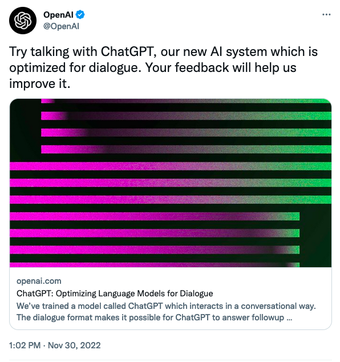
ChatGPT is an AI-powered tool that performs any written task delivering a conversational-style output. It’s one of the most powerful AI tools available and offers breath-taking results for many of the tasks it’s assigned to perform, which range from making small talk to developing software.
You can use it via your favourite browser, like Microsoft Edge or Google Chrome by registering an account with Open AI, the organisation behind it. Unlike other AI software, ChatGPT aims to perform well in conversational settings while offering accurate responses. However, this AI is far from being a typical chatbot.
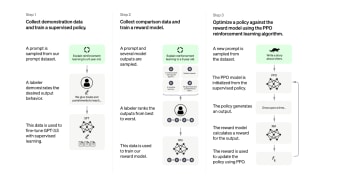
ChatGPT was trained with 570GB of data from all kinds of text. As such, it has one of the most extensive databases in AI. This makes it incredibly suitable for all sorts of situations where text output is required.
Advertisement
Avant-garde technology inside
For instance, you can ask ChatGPT to compare car models to help you find the one better suited for your budget and driving style. You can make it write a poem about a twig and laptops. You can feed it your code, and it’ll detect errors and suggest corrections. The possibilities are almost limitless.
Human-like behaviour
You may think this AI might be very knowledgeable but lacks that human touch. You’d be wrong. Not only can ChatGPT perform extraordinary tasks, but it also provides answers in a polite, relaxed way. Even when declining to perform tasks (for instance, certain banned topics), it’ll explain that it won’t do it and offer something else in exchange.
It can be useful for customer support and other areas where people need to solve an issue and need info presented in a clean, human way.

A game changer
Some people claim ChatGPT to be the end of society as we know it. For example, people can write their school tasks with it. You can ask it for something instead of googling it. It can come up with things on par with the most creative humans, leaving authenticity aside.
However, it’s still far from perfect since it can often give completely inaccurate (but plausible) answers. Because of the way ChatGPT was designed, it might be impossible to solve this issue. Luckily, these issues are few and far between. As it is, it’s a formidable tool when you’re looking for answers or help.
Advertisement
Technical
TitleChatGPT 1.0 for Web AppsRequirements
- Firefox
- Chrome
- Opera
- Safari
LanguageEnglishAvailable languagesEnglishLicenseFreeLatest updateFebruary 27, 2023AuthorOpenAI
Also available in other platforms
ChatGPT for Web Apps
- By OpenAI
- Free
- 1.0
Changelog
We don’t have any change log information yet for version 1.0 of ChatGPT. Sometimes publishers take a little while to make this information available, so please check back in a few days to see if it has been updated.
Can you help?
If you have any changelog info you can share with us, we’d love to hear from you! Head over to our Contact page and let us know.
Explore apps
Related software
- ChatSonicFree-to-try AI chatbot
- ClaudeAI chatbot
- Open AssistantFree AI assistant
- NovelAIFree AI text generator website
- Microsoft 365Microsoft 365 is Microsoft’s cloud collaboration suite (formerly known as Office 365), which provides a secure space to store, edit and share files and documents. It has a vast array of tools that can help to connect dispersed teams using shared calendars, messaging and conferencing tools. The business class email provides 50 GB of storage per user, and is able to send messages up to 25 MB in size. This is great for sending images and applying custom formatting. With Microsoft 365 you can customize inbox rules and notifications, and update your calendar and to-do list, in order to help you prioritize your tasks. The online chat and instant messaging tools let you communicate with colleagues more effectively along with one-to-one, or one-to-many voice and video calling. Some great features of Microsoft 365 are the collaboration and knowledge sharing tools for both internal and external purposes. Documents can be accessed and viewed by clients, and you can also create project-specific mailboxes and websites that can be tailored for specific teams, complete with automatic policies. Instant Messaging With Microsoft 365 you can use your computer for video calls and are able to conduct online meetings or connect with your co-workers via instant messaging. File Sharing The ability to share your work with others, and be able to collaborate together, is a must-have feature of today’s modern office. Microsoft 365 lets you store and organize your most important documents easily, with 10GB of overall storage to work with, you’ll never run out of space to store what you need. Calendars and Email You no longer have to be tied to your desktop in order to view emails and organise your calendar. With Microsoft 365 and a smart device, you carry your email and calendar with you, wherever you go. Calendars and Email can be accessed from any supported computer or smart device that has an Internet connection. Multi Language Microsoft 365 supports the following languages: Arabic, Chinese (Simplified), Czech, Danish, Dutch, English, Finnish, French, German, Hungarian, Indonesian, Irish, Italian, Japanese, Norwegian, Polish, Portuguese, Russian, Spanish, Swedish, Turkish, and Ukrainian. Supported countries include Australia, Canada, Europe, India, Latin America, Middle-East and Africa, United Kingdom, United States. Pricing Microsoft 365 uses a subscription pricing model, with plans starting from $4.00 per month. Microsoft also provides a free trial to test out the software (no credit card required). Bottom Line Microsoft 365 is a secure way to create, store and edit your documents online. Using Microsoft 365 you can run your business with powerful cloud services that don´t require any in-depth IT expertise. You can access your emails, and attend meetings virtually, along with sharing files or creating a professional website. No matter what it is you need, Microsoft 365 helps you be productive on the go. It works with mobile devices such as Windows Phone, iPhone, iPad, Android, Symbian and Blackberry, and can be accessed via Mac OS or Windows OS.
- GmailGmail is the free webmail, POP3, and IMAP email service provided by Google, which is integrated into its suite of web apps. Gmail is available to anyone who signs up for a Google account. Gmail is highly considered to be one of the best Web-based email accounts to have. Unlike its competitors, Gmail has a minimalistic, ad free homepage that is great to look at. As soon as you sign in, you can immediately see your inbox, the left bar shows your email folders and contacts. The service can also be linked to Google Chat. If you are signed in, your online contacts will also appear here, and you can chat to them without leaving the confines of Gmail. Key features include: Mass storage: 7 GB of free storage space available. Less spam: Gmail blocks spam before it gets to your inbox. Built-in chat: supported chat directly in Gmail or talk face to face with voice and video chat. Mobile access: Gmail mobile is available across many platforms. Gmail is fast and reliable and uses excellent spam filters to keep your inbox clean. The settings are easy to use and are highly customizable. You can adjust keyboard shortcuts, allow/ deny automatic images, set signatures and out-of-office auto reply. If you don’t like the original flavor, you can also customize a theme that suits you better too. Overall, Gmail provides a great webmail service. It has support across the board for Google’s apps and services and has a clean and fresh interface that is distraction free and easy to use. It supports offline access and Yahoo!, Hotmail and other mail services can be imported and integrated into your Gmail inbox to give you a well supported service.
- Google DocsCreate basic documents from scratch or start from a template. You can easily do all the basics, including making bulleted lists, sorting by columns, adding tables, images, comments, formulas, changing fonts and more. And it’s free. Upload your existing files. Familiar desktop feel makes editing a breeze. Edit and present with others in real time. Edit and access from anywhere. Publish your work as a web page. Choose who can access your documents. Share instantly.
- Pixlr Image and Photo EditorPixlr is a free online photo editing suite that is split into three different apps that have been built from the same engine. Simply pick the one best suited for what you need and away you go. As Pixlr is a web service it provides a solid platform to work from. You can combine image design and paint tools with photo editing. The interface is intuitive with a gentle learning curve, so users of all levels of expertise will be able to navigate it with few issues. If you want to create an image, layer one image over another or use a variety of effects, filters and level adjustments to transform photographs, Pixlr can do it all. Key Features include: Variety of filters and effects. Custom Brushes. Customizable user-friendly interface with movable and scalable windows. History window for quick undo/redo. Fee-hand crop, move, super-impose and interpolate images and rotate and remove entire canvases. Pixlr Editor mimics native photo editing apps such as Photoshop. The structure and design of this technical editor allows you to seriously edit images. The interface looks familiar with toolbars along the left hand side and top. Along the right hand side you have a Navigator, Layer Controller, and History. The top bar is equipped with layers, adjustments and a stack of filter options. Pixlr Express gives you an simple service with some neat features. You can start from four points; Browse, Open URL, Webcam, or Collage. The interface is simpler than the Pixlr Editor. You have six different editing tools to choose from: Adjustment, Effect, Overlay, Border, Sticker and Text. Next up is Pixlr-O-Matic. This is the simplest version of the app. It has the least amount of features, but, is arguably the most fun to use. You start by selecting your image, then you change the effect/distortion of the picture by choosing from a massive range of effects. Then you can change the border to finish. All three parts of these apps are well developed and have been designed with a specific purpose. If you need to edit your next masterpiece or even make a great cover photo, Pixlr is a great choice because no matter what platform you access the web app from, you still get the same standard, uniformed Pixlr experience. Overall, Pixlr is a very functional photo editing suite, with everything you could possibly need. The interface is easy to use and the tools are are varied as your imagination. Pixlr really is a perfect example of an app which hits all the right notes and provides a great, free service.
- PhotoFuniaPhotoFunia is a photo editing web app* that lets you upload your images into different scenes. You can upload any photo you like to place yourself in situations that would never happen in real life, such as your head in a lions mouth, or your dad’s photo inside a NASA spacesuit. With PhotoFunia it’seasy to add fun to your photos. The web app has stacks of preset images to insert your photos into. The interface is straightforward with a photo uploader and text fields to populate with your text. You can even change things like font and background, depending on the scene. Once you have found the perfect scene and thought of a witty comment, now you’re ready to share your creation with your friends. There are social network buttons integrated to the web app, so you don’t even have to save your creations and upload them separately. Overall, PhotoFunia is free and very easy to use. Just select an effect you like, upload your photo and share! *PhotoFunia is also available on Android, iOS, Windows Phone, BlackBerry, and even Symbian.
- Microsoft ProjectMicrosoft Project is a flexible tool for project management, which is delivered through Microsoft Office 365. It is a comprehensive project management solution that has been designed for businesses of all sizes, from SMB to large corporations. Microsoft Project enables businesses to get started, manage project portfolio investments, and then successfully deliver projects, on time, with value. Microsoft Project provides your business with a powerful, visually enhanced way to efficiently manage a wide range of projects and programs. From meeting important deadlines, to choosing the correct resources, Microsoft Project provides new and intuitive ways to plan, collaborate with various individuals and teams, and manage projects successfully. For instance, a noteworthy feature of Microsoft Project is the ability to easily copy project information to Office apps such as PowerPoint and save important data to Office 365 or SharePoint. A key feature of Microsoft Project is the ability to add new tasks or revise the organization of a project, midway through it. Because, as you well know, the goal posts can (and often do) change during a project. Microsoft Project lets you work efficiently and effectively, as you are able to prioritize tasks and can manage your projects effectively from anywhere. Microsoft Project also comes with project budgeting tools that can help you estimate the costs for the entire span of a project. With tools for project scheduling that allow you to define tasks, and assign them to various teams, along with having the ability to track assignments, you will always have a clear vantage point, to oversee projects from. Reporting With Microsoft Project you can create extensive reports and analyses directly from the platform. The functions are very similar to those of Microsoft Excel and Microsoft Word, so will be familiar to many users. Multi Language Microsoft Project supports the following languages: Arabic, Chinese (Simplified), Chinese (Traditional), Danish, Dutch, English, French, German, Hebrew, Italian, Japanese, Korean, Portuguese, Russian, and Spanish Pricing Microsoft Project uses a subscription pricing model with plans and pricing available on request from Microsoft. There is also a free trial available (no credit card required). Bottom Line Microsoft Project offers flexibility and choice by providing tailored work management solutions for individuals, teams, and enterprises. With interactive dashboards and reporting functionalities, project managers can prepare insightful reports and make executive decisions regarding key issues, such as time scales and staffing levels. Microsoft Project can be deployed both on-premise and in the cloud. The advantage of the web-based version is that it allows project managers to collaborate with their team remotely using smartphones and mobile devices. Overall, Microsoft Project is exceptionally intuitive and provides a great balance of complexity and usability. It is used in various industries, including government, manufacturing, construction, pharmaceuticals, retail, financial, and health care services.
- Open DNSOpen DNS is a DNS resolution service. It provides easy-to-implement Internet navigation and Web security solutions for families, schools, governmental organizations and businesses of all sizes. The services provided by OpenDNS increase the speed of navigating websites and prevent unintended access to phishing and malware sites as well as to any Web content that you configure to be restricted. Key Features include: Faster, more reliable Internet Internet security. Customizable filtering and security. Cloud service. Parental controls that protect every device. Phishing protection. Premium DNS. Malware and botnet protection. For small businesses and families with children, OpenDNS provides a relatively simple method of keeping users away from questionable material on the Web. It has a clean, well-explained interface that makes it simple to block individual domains or categories of online sites by simply logging into your account and entering your preferences. OpenDNS’ phishing protection can identify and stop sites trying to phish your personal data. It works with all operating systems and browsers, and supports any other security measures that are already in use, such as a firewall and anti-virus software. Overall, OpenDNS can make your Internet experience safer and faster for you and everyone using your network.
- Video GrabberVideo Grabber is a video downloading web app that is really simple to use. With it you can download videos from popular video websites such as YouTube, Vimeo, and Dailymotion etc. The web app requires you to download and install a small launcher package on your computer. After this process, you are free to grab whatever online media you choose. Grab Online Video Simplicity is the key with Video Grabber. After installing the launcher package on your computer, you simply locate the video you want, copy the URL, and then paste it into the Video Grabber webpage search field and the web service will locate the video file for you. Next, you need to choose the format you would like and click the download button next to it. The content will then be downloaded directly to your computer. Convert Video A really useful tool in the Video Grabber web service is the ability to convert video. From the main webpage, navigate to the Convert Video button, you will then be asked to choose a file to convert. After selecting the file, you are then presented with an array of output formats to choose from. Here is where you can also edit the file data, add a Watermark, change the Resolution, Bitrate and Framerate for video and alter the Bitrate, Channels and Sample Rate for audio. After you have tweaked the file to your liking, simply hit convert and the file will then be converted and saved to your computer. Record Screen Video Grabber also allows you to record your screen. This is a nice feature that lets you record, then save the file as either as a screenshot or a video. Pricing Video Grabber is a free to use service. Bottom Line Video Grabber is a great web app that provides a good service and has good functionality. The web interface is very easy to use and can be navigated by users of all levels of expertise. The conversion options are really good and the screen recording tool is accurate with no glitches. Overall, Video Grabber is a useful utility to have stored in your browser favourites for when you need to grab some content and edit it directly from the web.
Last updated
- Open AssistantFree AI assistant
- Universal BypassFree web tool
- CapCutFree website for video editing
- Brave SearchFree search engine
- PDFDoctorOnline PDF converter
- PixlrOnline photo editor
- DogpileFree meta-search engine
- Sfile.mobiFree web-based file-sharing service
- Adobe FireflyFree visual generative AI tool


Hi there to all, for the reason that I am genuinely keen of reading this website’s post to be updated on a regular basis. It carries pleasant stuff.
Pretty! This has been a really wonderful post. Many thanks for providing these details.
I appreciate you sharing this blog post. Thanks Again. Cool.
I just like the helpful information you provide in your articles
I do not even understand how I ended up here, but I assumed this publish used to be great